Sunday, May 12, 2013

Mega Meet Goodies....

Hey there, hope everyone had a great Mother's Day.  Thought I'd pop in with some pictures of the cards I made on Thursday while at the Mega Meet in Novi Michigan.  My friend Allison and I had a great time and I got to see Tim Holtz and get my stamp sets and Ink tool autographed.  We just wished we had more time to go, maybe next year.

These items are from my Heartfelt Creations card classes.  I love this company and enjoy a class or two they offer every year....I took 2 card making classes this year so I can stock up my dwindling card stash.
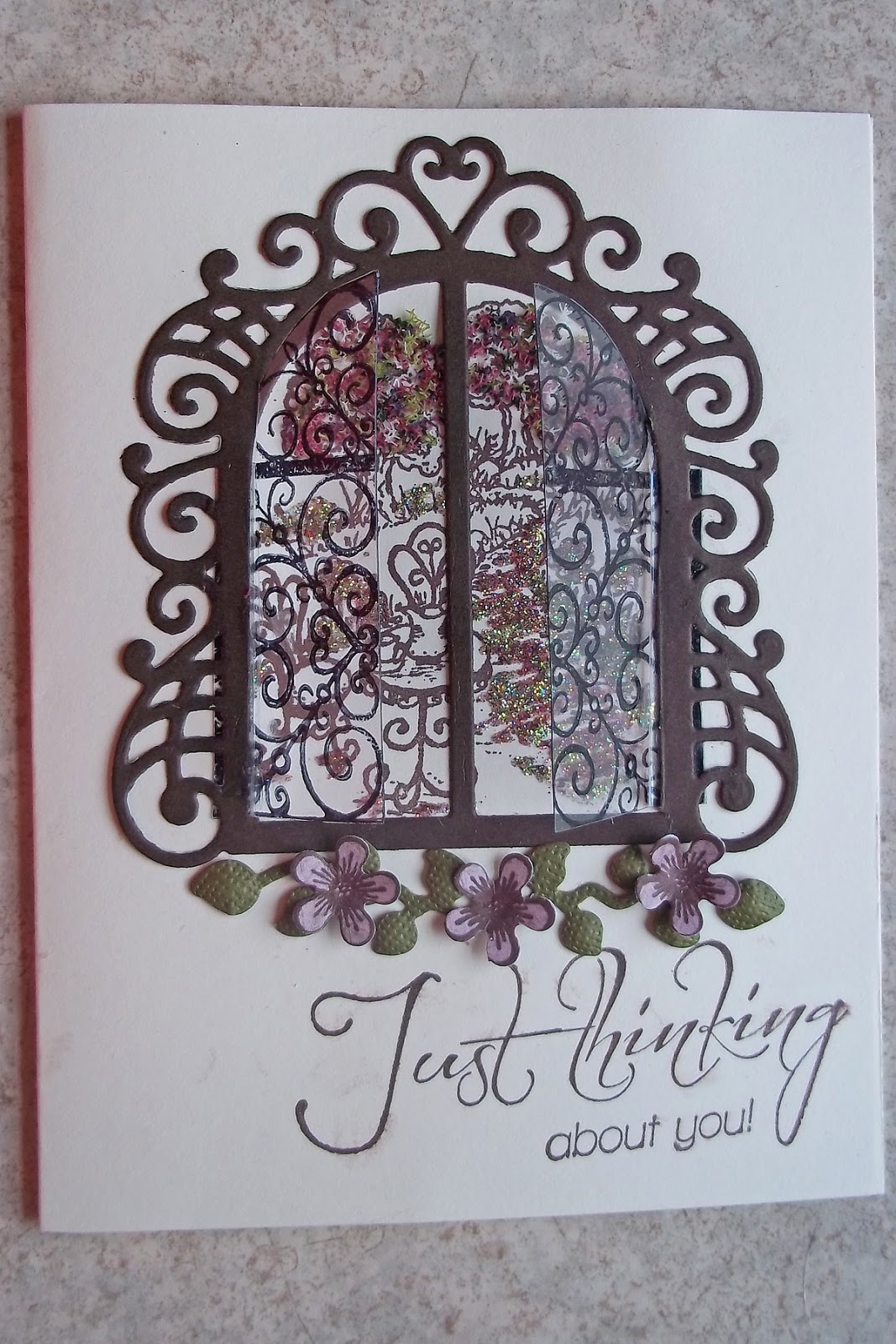

This is the first card in the second class...you can't see it very well, but there are acetate "windows" which are slightly open. We used variegated flower soft on the trees, green and autumn colored glitter on the flowers, grass and pathway.  I never would have though to color with glitter, always used markers...so this was my "new" technique that I learned.

 
Next we have a feminine lacy gatefold card.  I really love the velum embossed flower.  I added some cotton candy stickles and a queen and company flower shaped Goosebumps to the center of the flower.

 
This step card was really quick and looks quite elegant, the photo doesn't do it justice.  Lots of sparkly glitter on the butterfly, flowers and leaves.
 

This was the first card we made in the other class, we learned how to ink, shape and embellish the flowers and leaves.

 
 Below is a close up of the "shattered glass" embellishment on the flowers.


This flowerpot card was a big hit in the class...I decided to use some "Bling" for the flower centers after the air conditioning flipped my scratch paper full of glitter all down the front of me....lol...You could say I had quite the "sparkling" personality the rest of the day...

 
Here's a pic with the gift card out of the pot...I left the stamping off so I can use sentiments appropriate for the occasion when I give it...

 
This card was a very quick yet elegant card.  The class ran a little long so I had to assemble the rest at home...I thought the swirls needed a little pen work and some pearls...


I also took a PK Glitz class where I made 2 tags, since the floral and leaves were acetate and glitter, I waited until I got home to assemble them with liquid glass, they are still a little damp so I'll get them photographed later.

I really wanted to take the PK Glitz vintage hues class which made "vintage looking" glittered cards with acetates.  I double booked myself so that I could get the kit for that class to work on at home, but haven't had time to get to it yet. 

The other class I took was the Queen and Company Trunk Show....oh my!!!  My mouth was watering at all that bling.  This is the first year I took that class but it won't be the last!!!  I think I'll add this class to my list of MUST HAVE classes along with the Heartfelt Creations classes.

Thanks for stopping by...

Freda

Thursday, April 25, 2013

Using My Tim Holtz Sutff....my first projects....

I cannot believe the weather....70 one day snowing the next....Well that's Michigan for ya.....lol

Since I couldn't get back outside and work I decided to play with my Tim Holtz stuff....This is my take on a tag I liked on Scrapbook.com.  (Click here to see the original tag)


Dang, I forgot to put the "wire smoke" on the little green house...I'll have to do that soon....  The flower at the top was colored using the enamel technique and the melting pot (put a Melting Pot Project Craft sheet in an empty melting pot...preheat to Utee setting...place metal object on craft sheet allow to heat up for a bit...sprinkle with embossing powders and watch the magic happen.  When the embossing powder has melted lift the craft sheet by wings and set aside to cool) ...I love how it makes these metal embellishments look.  Tim Holtz's embossing powders are solid colors all the way through, some other brands are white core so they give a mottled appearance when they melt.  The green on my leaves were done with a white core embossing powder....LOVE IT!!!


The metal embellishments were added once I decided the card needed a little something more...the flowers on the deer don't match to well...so I'll take a post it note and slide it under the bottom layer of petals and color them with a distress marker until they are better matched...  The deer were cut from grunge paper, inked with distress ink in Vintage Photo and quickly covered with gold Perfect Pearls...I'm thinking their edges need a little more "inking" so they stand out a little more from the tag. 
 
I don't think this is too shabby for my first card...it can only get better from here....right!!!
 
 
I couldn't sleep so about 4 this morning I got up and started working on this project...I saw a podcast on ITunes from Scrap Time...it was episode #845.  She was putting together a Make n Take she had gotten from Tim Holtz at this year's CHA.  One of these days I'll have to go to a CHA show...that would be heavenly....
 
Here's my take on using the a New Cabinet Card for a home décor project....(once again, I didn't have some things they used, so I made due with what I had)...
 
 
My favorite feature on this piece is the filmstrip...I heated the ends with a heat gun then curled them ...the neat thing about the film strip is that if I didn't like how it looked when it cooled I just heated it again and it would straighten right out....I think I heated each side 2-3 times before I liked the way it looked...
 
 
Well that's all for today...I'm off to the grocery store....
 
Thanks for stopping by...
 
Freda


Friday, April 19, 2013

WANTED HOME DECOR PROJECT AND GIVEAWAY!!!!!

Here's my Cricut FANatics blogpost for April:


Hey there, it's Freda from CannCreate Designs with another 3D project

from SVGCuts and MTC using my Expression.

This project has was made for the top shelf area of my scraproom desk...
makes me smile every time I look at it.


As soon as I saw the Happy Trails set of designs I knew I had to make it using a picture taken at Sears years ago of my grandson in a hat.  The wanted poster was originally intended to be a card, but I wanted it on a 12 x 12 canvas so I enlarged the file to fit the canvas. I purchased the Sasparilla Collection papers by October Afternoon to use because I LOVE the comic strip cowboy paper included in it.
 
Paint the sides and a little on the front of the canvas black and let dry. Trim the background paper to 11 3/4" and apply to the canvas with Mod Podge and let dry*.  Use Black StazOn to ink the edges of the paper once dry. 
 
*NOTE:  In a previous project years ago where I used Mod Podge and didn't allow each layer to completely dry before adding next layer I wound up with bubbles and buckling of the papers once the final project was completely dry.  I flip the project over and brayer the open area of the canvas and use the Cricut spatula to rub under the wooden frame area.  I haven't had any bubble issues since using this technique.
 
Enlarge the Paper, Text and Frame files from the Wanted Poster Card folder to fit on the 12 x 12 Mat angled slightly then cut it out.  (Be sure to cut your frame and text out before printing your photo, you will need to measure the area of the frame you cut to get the correct size for your final picture...speaking from experience....lol.  Ink the edges of the Paper file and mod podge to the canvas and allow to dry.

I'm so glad I bought the digital files so that I could tinker with it.  I had the photo reprinted on matte paper but found it was to "new" looking for this project.  So I opened it in Photoshop and ran the wanted poster action from Panos Effects Old Papers Action Set which I had purchased years ago, you could also use the built in Sepia tone action since the final product you're looking for is the photo.  I used the Wanted poster action because you can try out different items like bullet holes, stains, nails and cracks etc. for cool effects on your picture, if you don't like them you just hide or delete them.  When the photo looked "right" to me I cropped the file down to just the photo approximately 1/2" larger than the size needed for the area on the frame where it will be placed which you cut previously.  I printed the photo on cardstock and used a pair of decorative scissors to trim the picture down to approx. 6" squarish , distressed the edges then inked with StazOn.

Assemble the frame, text and picture layers then mod podge it to the "Paper" layer.

I thought the frame still needed a little something extra so I braided 9 strands of jute into a large flat braid and placed it around the sides of the frame, and a small braid for the hanger.

 
I stapled the start of the braid at the top of the frame and glued it around the sides with Zip Dry adhesive.  I trimmed the excess and stapled the other end where they met. I didn't like the appearance of the staples so I cut some jute to create a "fuzz", spread Zip Dry over the stapled area and pressed the fuzz into it...now you can't see the seam or staples.  I also did this to cover the staples on the hanger so they wouldn't scratch the wall when I hung it up...  I used large rubber bands around the outside to hold the braid in place while the glue dried.


The tag was made using Tim Holtz Distress Inks on a manila tag from the office supply store.  The lettering & banner came from Sizzlits dies Typeset and Tattered Banners.  The heart was a grunge board shape that I inked and fiddled with for 2 days to get it just right then couldn't wait for it to dry naturally.  I used my heat gun and wound up getting to close and suddenly had volcanic like eruption of paint and ink-My beautiful heart was broken.  I thought about it for a minute then covered the entire thing with red glitter, then drew lines of glue across the heart and applied gold glitter....let it dry without the heat gun.  The next night I applied Glossy Accents thickly and let it dry for a couple days.  Add a jute string and "fray" the ends and your tag is ready to be added using pop dots.

The boot and the pot were assembled using the video instructions on the SVGCuts.com website.  The boot itself was a little tricky on the front area, but they explain it quite well in the video...I couldn't even begin to explain.  Unfortunately I assembled the boot & pot at a crop and didn't take to many pictures of the assembly process.


You might notice that I changed the orientation of the horseshoe before cutting it out.  My grandma always said if you turn a horseshoe up side down all your good luck falls out...lol...I'm superstitious so I used the software to move the assembly tabs to the bottom of the shoe so my good luck doesn't get poured out...


Now for the Good Stuff-The Give Away:
 
If you would like to try your hand at assembling the boot but don't have the ability to cut one, I cut an extra boot to give away.  This will come unassembled, it has been inked and embossed you just add the glue...lol....
 
Embossing folder not included....it's in the picture so I can remember which one I used

 
Mary has a really detailed video tutorial that you can watch to help you with the steps of assembly and of course I will gladly answer any questions you may have just click the link to see it on Youtube: 
 
 
To win all you have to do is leave a comment on the Cricut FANatics blog post for this project Cricut FANatics Blog ..... Don't forget to put your email addy in the comment section so I can contact you for mailing details....I will put the names in a hat, draw and post the winner Friday, April 26th.  Everyone is welcome to enter.
 
Thanks for stopping by and good luck!!!!!
 
Thanks for stopping by.
 
Freda
 
Designed by:  Freda Cannon 
Machine Used:  Cricut Expression
Project Type:  Home Decor 
Products Used:  MTC Software; Happy Trails Svg files; Sasparilla Collection Paper by October Afternoon; Mod Podge; StazOn Ink; Photoshop Software; Panos FX actions for Photoshop; Tim Holtz Products: Typeset Alphabet, Tattered Banners and Grungeboard Heart, Martha Stewart Red & Gold Glitters, Glossy Accents, Twine and Jute. 

Tuesday, March 19, 2013

An Eggciting Little Project To Share

I've been so busy getting kits ready for the crop I'm going to this weekend that I haven't posted anything for a month...after this weekend I'll be posting lots of finished projects.....In the mean time here's my posting for the Cricut FANatics blog for March. 

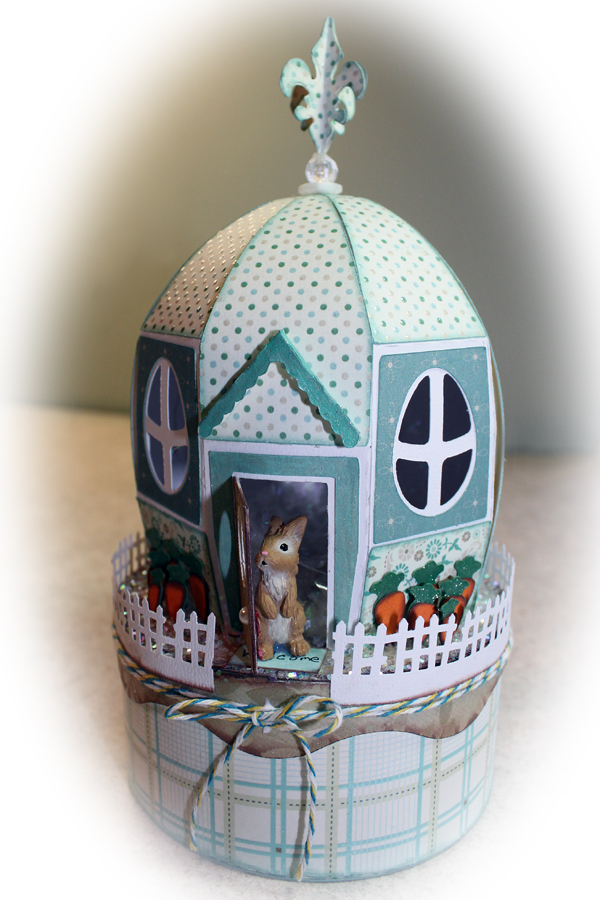
Hey there folks,  Freda from CannCreateDesigns here again to share another 3D project using MTC software and the Cricut Expression.  As soon as I saw the Cotton Tail Village set from SVGcuts I knew I had to make the egg box for you.

 
The base of the egg was cut from white cardstock from my stash, the panels were cut from a DCWV paper pack called "The Linen Closet" that I had purchased at Joann's the day before the cut files were released.  They worked out perfectly for this project.  After watching the assembly video on the SVGcuts website I cut everything out and laid it out to make sure that I have everything to get started.
 
I just realized that I didn't take any pictures of the box bottom and lid assembly for some reason but the assembly of the box bottom and lid are pretty clear on the website video if you need assistance...Next I chalked all the edges that need embellishing with coordinating colors of VersaMagic Dew Drops.  I love these chalks and have worn out more than a few of the Jumbo Java color which seems to go with everything vintage looking. 
 
 
After chalking the panels I begin assembling the egg base.  These panels cut with score marks for easy folding and are numbered so you don't have to guess which one is next.
 
For this particular project I found it easier to glue all of the points at the top and allow them to dry first, then glue the bottom part.  I used Clothes pins to help hold the pieces in place while gluing the next piece down, without the clothes pin they popped loose as soon as I moved to the next panel.  This just seemed easier to me because of the small  opening at the bottom and the stiffness of the cardstock I was using.
 
 
Once completed I thought it could use a little bling (of course).  So I added Doodlebug Design Sugar Coating Glitter around the top of the box. Made a little welcome mat, and added a Martha Stewart Border Punched Fence (think it was the Halloween one).  I found this little bunny at the TSC Farm store that was the perfect size, cut some carrots for a garden from the Create a Critter cartridge (cut at 6@ .75", 4@  .60",  2@ .5"). 
 
Inking those little carrots can be a pain...but I've figured out a way to do it a little easier with my tweezers...just pick it up and tap it onto the ink/chalk pad.  When the carrots are glued together put a blob of glue on the end and hold it in place on the box until it stands on it's own.
 
There was still something missing...a quick glance around my scraproom and I saw some twine that I tied around the lid and the Tim Holtz Mini Fleur die I had bought on clearance the day before.  I cut 4 fleurs, scored and glued them together.  Attached a button and a bead to the top of the egg.  After the glue in the bead/button piece dried I put glue on the end of the fleur and gently pushed the end into the hole in the bead.  Wallah!!! Finished....
 
 
I hope you like this project as much as I liked doing it...
 
Thanks for stopping by,
 
Freda

Tuesday, February 19, 2013

CraftRoom Freebies

CRAFTROOM FREEBIES
Hello again, it’s Freda from CannCreateDesigns here with two quickie projects using the Mini Books Project Cartridge and the Freebie Creative Cards preview that are free in the CraftRoom through the 20th.
It’s my son’s birthday next month and even though no one else in the family drinks coffee he has developed a taste for it. When I saw the Starbucks Lovers Gift Box on the Cricut With Heart Blog at Christmas time I printed out the page and put it in my “to make” pile for his birthday.

Using the Cricut Mini Books Project Cartridge I cut the outside layer only of the exploding box on pg. 11, scored the fold lines and inked all the folds on the inside and outside. To make this project even quicker I used coordinating double sided paper from my stash so I didn’t have to cut any panels to decorate it. I also used a couple of leftover stickers from my stash for decorating the top.

I suggest that you put the thicker objects on panels across from each other and the thinner items on the other 2 panels, that way when you close up the box the folded “wings” have somewhere to hide without distorting your box. I left these “wings” in to provide support since the gum and cookies are heavy. I stacked pop dots on the bottom of the cup until they were tall enough to stick to the center of the box bottom. The empty panel is waiting for a Starbucks Gift Card. They were out of the Happy Birthday ones the day I was in there getting the cup, samplers and gum.
 
The Banner came from the Artiste chipboard and stamp set that came with the cartridge (pop dot it up to make room for the ribbon to slide under). The cut itself is on page 35 cut at 1 ¼ “. I used a coordinating VersaMagic chalk round the edges of the banner. Butchers string was used as a ribbon since it matched the ribbons on the paper.
Next I decided to make a card from the Creative Card Freebies. When I first saw the samples I thought they were a little too plain for my taste so I wanted to “bling” one up to see if I would like it better. The card on the right was just cut and assembled. The card on the left was embossed, glittered, inked and bling’d up.


The extra bling didn’t take too long so I guess this cartridge would come in handy to use in a pinch when I needed a card quickly.
NOTE: I sized the card in CraftRoom to be a 4 ¼ x 5.5 and only cut the layers. I used up some of my stash of 8 ½ x 11 cardstock cut in half for the bases of the cards instead of cutting them on the cricut and I have tons of envelopes. Skipping those items saved a lot of time making these cards.

Thanks for stopping by,
Freda

Cricut Info and Other Supplies:
Designed by: Freda
Cartridges Used: Mini Books, Artiste, Creative Cards
Cricut Machines Used: CCR, Cricut E2
Other Supplies Used: card stock, distress ink, swiss dot embossing folder, Queen & Co Goosebumps & Rhinestone Trios, CTMH Artiste stamp set & chipboard, extra fine glitter.


Tuesday, December 18, 2012

Hot Chocolate Teapot Display Set

Finally, the reveal of the finished items from the Mommy and Me play date I posted a few weeks ago....I am very pleased with how these items turned out, hope you like them too!!!  This project is also posted on the Cricut FANatics blog, be sure to stop by there and see all the talented designers and their projects...http://www.cricutfanatics.blogspot.com

Hot Chocolate Teapot Display Set 

Hello again, it’s Freda from CannCreate Designs.  I posted a little teaser for this project on my blog a couple of weeks ago showing the unembellished teapot and got a really good response from viewers.  This is going to be a really easy posting for me today because SVGcuts does all the work, they produce excellent step by step videos telling you how to assemble the files you purchase from them, the only thing I had to do was decide on the papers and types of embellishing I wanted to use. 

 
These items were cut on my Expression using MTC.
You can also use SCAL if you have that software.
They were not cut using Cricut Cartridges.

 
Making papers bend looks a little daunting, but if you take it step by step it is really easy.  Each piece is numbered and cut with tabs for gluing and folding so all you have to do is bend and it folds exactly as needed-no having to use a score board, assemble them together in numbered order and you’re done.  Here’s a picture of the base pieces showing the numbering of pieces, tabs and fold lines that are cut.
 
 The Half Naked Truth
Here’s what the pot looks like before the panel pieces are attached.


Now presenting my Hot Chocolate Centerpiece 


Making papers bend looks a little daunting, but if you take it step by step it is really easy.  Each piece is numbered and cut with tabs for gluing and folding so all you have to do is bend and it folds exactly as needed-no having to use a score board, assemble them together in numbered order and you’re done.  Here’s a picture of the base pieces showing the numbering of pieces, tabs and fold lines that are cut.
I used two files I purchased from SVGcuts.com and the MakeTheCut software to make this set.  This should be an easy posting because they do all the work.  (disclaimer-I am not affiliated with these companies, I’m just really satisfied with the results I get when I use their products).

Tea for you and Me:
http://svgcuts.com/index.php?main_page=product_info&cPath=44&products_id=308

Home for the Holidays:  (Pitcher)
http://svgcuts.com/index.php?main_page=product_info&cPath=3&products_id=334

 
There are 3 different types of pearls used on the teapot.  For the spout handle and around the top of the lid I used the small pearl “lines” made by Paper Studio (I should have checked my stash quantity first-ran out and didn’t have enough to do any of the other projects with them).  Around the the rim of the pot and the “dangly” pearls in the bow I used pearls by the yard I bought at JoAnn’s.  Around each tab on the lid and on the small dangly I used the large Queen and Company Pearls.  I’m going to make a cameo charm for this bow, the Round 25 set I used on the pitcher was too large for this spot.
 
The paper I used had a silver script writing on it, you can see a little of it in this picture.

Next we have the Pitcher from the Home for the Holidays set.  The cameo charm was made using a cut from the Cricut Heritage Cartridge at 1” and Epiphany Crafts Shape Studio Round 25 punch and the coordinating charm and bubble caps.   Pearls by the yard and Queen and Company large pearls were used on the pitcher.
 
I used the cameo and a white circle which made my cameo 2 layers of paper, when I put the bubble cap on it looked a little “milky” in spots.  I flipped the bubble cap over on a sponge (to avoid scratching the bubble) and used the cricut stylus to push the white back into the bubble cap adhesive.   After burnishing the paper to the cap, I used Glossy Accents to glue to the metal charm. 
  The Burnished Cameo: 
Doing this step makes the white back attach to the bubble cap and get’s rid of the milky appearance you get when using 2 layers of papers.

For my pearl embellishments on the teacup I used a large, medium and small pearl on each panel.  I chose a coordinating paper to do the panels on the saucer and the inside of the teacup (mostly because I didn’t have enough of the brown patterned paper-having 5 sheets would have been enough but I only had 4).  Then to top it off I threw out the scraps before assembling the spoon so I didn’t have any of the papers for the center piece of the spoon.  I also noticed that the pearl at the base of the handle had come loose and moved in this pic, it has been moved and glued back down.
 
Last but not least is the hot chocolate holder.  My family LOVES hot chocolate so much that I bought a Keurig for us to use last Christmas when everyone came home.  Little did I know that my son was buying me that Hot Chocolate dispensing machine too…lol

This piece was the only one that gave me problems, if you look close you’ll see that it’s “wavy” in spots.  This piece is a box inside of a box with trim around the top.  The space between the 2 boxes is “hollow.”  When I put the 3M quick dry adhesive on the decorative piece the base got a little distorted.  If I make another one of these I would cut some foam core to attach to the outside pieces to prevent the distorting with wet adhesive.    I used Snug Hug seam binding, a large pearl and pearls by the yard for embellishments on this piece also.
 

I hope you enjoyed my project, it was a wee bit time consuming, but well worth it.  I’ll have a beautiful display for my counter when the kids come home for the holidays.  I just wish the sun would shine on the day I’m photographing my blog submission.  Maybe Santa will bring me a photo box for Christmas…lol

Merry Christmas to one and all, see you next year.                                                                              

Freda

Machine Used:  Cricut Expression
Files Used:  Cricut Heritage Cartridge for Cameo shape.  SVGcuts Home for the Holidays (Pitcher) and Tea for You and Me
Paper:  GCD Studios Ella Blue Collection Pack designed by Tina Higgins.  American Crafts White Cardstock
Supplies:  3M Quick dry adhesive, Pearls-Queen & Company, By the Yard from JoAnns, Paper Studio Pearl Lines, Epiphany Crafts-Shape Studio Round 25, Bubble Caps and Charms.  Snug Hug White Seam Binding